

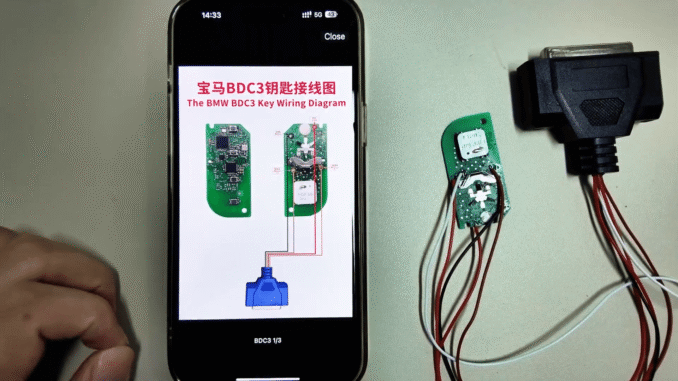
This guide demonstrates how to read encrypted BDC3 data and generate an FGB smart key using KD-X4 key programmer
Step 1: Upgrade KD-X4 to the Correct Firmware Version
Before starting, make sure your KD-X4 is updated to firmware version 1.52 or later. Encrypted BMW BDC3 key reading is only supported in newer firmware versions.


This upgrade ensures compatibility with encrypted data structures and enables FGB key generation.
Step 2: Connect the Wiring Harness Correctly
Use the dedicated wiring harness to connect the BDC3 module to the KD-X4. Follow the pin layout exactly as shown, paying close attention to power, ground, and communication lines.

Improper wiring may result in failed data reading.
Step 3: Read and Save Encrypted BDC3 Key Data
Once connected, use KEYDIY KD-X4 to read the encrypted BDC3 data. After a successful read, save the data file to ensure it can be reused if needed.


This step confirms that the encrypted data has been correctly extracted.
Step 4: Generate and Program the FGB Smart Key
After data extraction, proceed to generate an FGB smart key wirelessly using KD-X4 5-in-1 Key Programmer. Follow the on-screen instructions to complete key generation and finalize programming.


The complete video guide:
Leave a Reply